Why 500+ Mid-Market Companies Are Replacing Legacy Video Tools with Vidnoz AI
Mid-market companies are under increasing pressure to create professional videos faster, reduce production costs, and scale content across multiple teams. Traditional video tools often require complex workflows, specialized skills, and significant time for every update. This is why more businesses are turning to Vidnoz AI, which provides AI tools to simplify video production. In this guide, we’ll learn everything about Vidnoz AI and also explore why 500+ mid-market companies are making the switch. Ensure you read this guide till the end.
Part 1: What is Vidnoz AI?
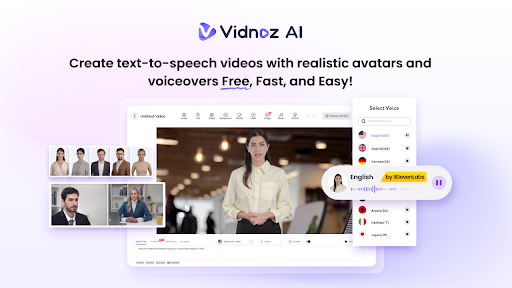
Vidnoz AI is an online AI video generator that enables users to produce high-quality and engaging videos with simple text prompts — no editing experience or professional help required. The platform uses AI-powered tools to simplify video creation, allowing businesses, marketers, educators, and content creators to turn ideas into professional-looking videos in minutes. Users can choose from AI avatars, natural-sounding voices, and customizable templates to create content for marketing, product promotion, social media, and more.
One of the best parts of Vidnoz AI is that it is certified with ISO/IEC 27001:2022 for Information Security Management. With an easy-to-use interface and a wide range of AI-powered features, Vidnoz AI helps teams streamline their video production process, reduce time, and produce content at scale.
Part 2: Key Vidnoz AI Features for Mid-Market Companies
The program includes a wide range of features and capabilities, making it a standout option for mid-market companies in 2026. Below, we’ve mentioned the top features of this program:
- Customizable Templates: Vidnoz AI offers 2800+ templates, allowing users to create various styles of videos within seconds, including marketing videos, product promotions, social media content, employee training videos, business presentations, educational content, and more. Users can customize these templates by adding their own text, images, and more.
- Realistic AI Avatars: The program includes 1900+ lifelike AI avatars from different industries and roles, such as doctors, nurses, teachers, students, news reporters, business professionals, marketers, and customer service representatives. Plus, users can create a digital twin in 40+ languages using Avatar Lite. The Expressive avatar feature provides realistic facial expressions, gestures, and body movement.
- Natural-Sounding AI Voices: Vidnoz AI provides 2000+ AI voices, all powered by ElevenLabs, Google, and Microsoft. It includes realistic voices of celebrities, politicians, musicians, cartoons, and more. In addition, with voice cloning, users can create a synthetic voice using audio recordings that resemble 99% of the real voice.
- Free Version: One of the standout features of Vidnoz AI is that it offers a free version, allowing users to create engaging and professional-looking marketing videos without spending a single penny. The free version includes multiple AI tools, such as text-to-video, AI voice changer, AI headshot generator, AI voice changer, and online video editor.
- AI Video Wizard: With Vidnoz AI, creating high-quality and engaging videos is simple. The AI Video Wizard helps users transform an idea or written prompt into a complete video by assisting with script, scenes, visuals, avatars, voiceovers, and overall structure.
Part 3: Use Cases for Vidnoz AI in Mid-Market Businesses
Mid-market companies need to create video content for different departments, from marketing and sales to employee training and customer support. Here are some of the most common ways businesses can use Vidnoz AI:
- Marketing and Advertising: Businesses can create product promotions, social media videos, advertisements, explainer videos, and campaign content without relying on traditional production methods.
- Employee Training: Companies can use AI-generated videos for employee onboarding, training, tutorials, workplace instructions, and educational materials.
- Sales and Product Demonstration: Sales teams can create engaging product demonstrations, personalized presentations, and video pitches to explain products or services more effectively.
Part 4: Step-by-Step Guide: How to Use Vidnoz AI
Vidnoz AI Video Generator offers an intuitive interface, allowing users to create high-quality videos without editing experience. Here is how to use Vidnoz AI:
- Visit Vidnoz AI’s official site and click on the “Create Free Video Now” button. Choose the video template and AI avatar.
- Input the text prompt and select the AI voice. With Vidnoz AI, users can also select the language of the video. It offers 140+ options, such as English, Chinese, Turkish, Russian, and more.
- Next, use the online video editor to customize it according to your requirements. Users can change the background, add music, insert text, and modify the script.
- Once all the requirements are complete, click on the “Generate” button to begin the video creation process. Within seconds, your AI video will be ready. Preview the results and click on the “Download” button.
Final Thoughts
As businesses look for faster and more cost-effective ways to create professional video content, AI-powered platforms are becoming a practical alternative to traditional video tools. Vidnoz AI brings video creation, AI avatars, natural-sounding voices, customizable templates, and editing features together in one platform.